Compression Checks
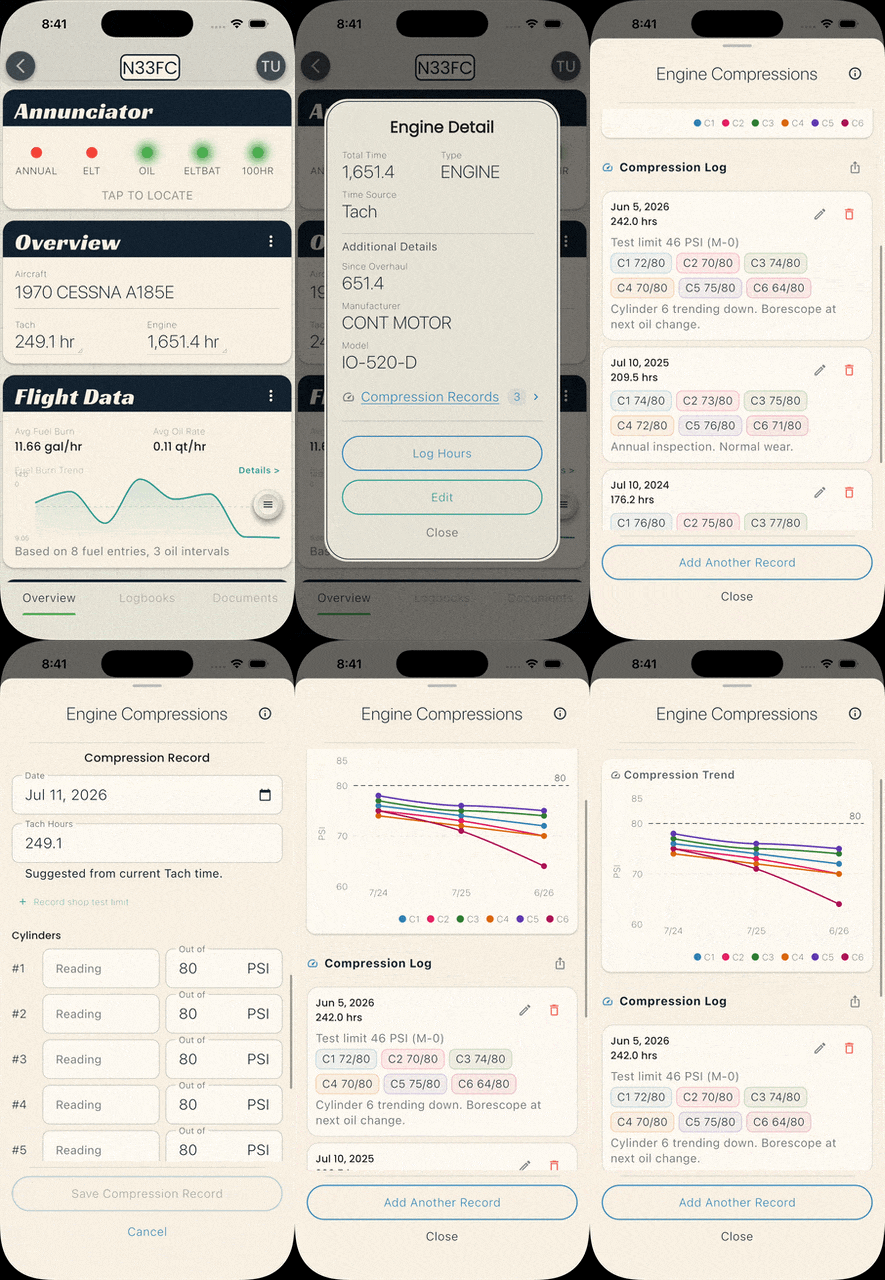
Your mechanic measures cylinder compression at every annual. If you record the numbers here, BetterPlane charts each cylinder over time, so the history is easy to pull up and share.
You need the Officer or Manager role to add, edit, or delete compression records.
Compression records live on an engine component. If your aircraft does not have one yet, add it first (see Adding Components).
Opening compression records
Section titled “Opening compression records”- Open the aircraft and go to the Overview tab.
- Tap the engine component card.
- Tap Compression Records.
This opens the Engine Compressions sheet. Scroll down to see the trend chart and the log of past checks.
Adding a compression check
Section titled “Adding a compression check”- Tap Add Compression Record (or Add Another Record if the engine already has checks).
- Tap the Date field and select the test date.
- Enter the Hours at the time of the check. This field is optional.
- Optional: tap Record shop test limit to enter the tester’s leakage limit, then enter it in the Tester’s Limit field.
- For each cylinder, enter the Reading and the Out of pressure. For example, enter 72 in Reading and 80 in Out of for a 72/80 result.
- On the engine’s first check, use the plus and minus icons next to Cylinders to set the cylinder count. Later checks reuse the same count automatically.
- Optional: add Notes.
- Tap Save Compression Record.
If you leave the sheet with unsaved changes, BetterPlane asks you to confirm before discarding them.
Manufacturer guidance
Section titled “Manufacturer guidance”Tap the info icon at the top of the Engine Compressions sheet to read what engine manufacturers publish about differential compression checks. BetterPlane shows cited summaries for Lycoming, Continental, and Rotax, with your engine’s manufacturer listed first.
BetterPlane records your readings and relays the manufacturers’ published words. It does not judge a reading. Airworthiness decisions belong to your mechanic or IA.
Viewing past results
Section titled “Viewing past results”Past checks appear under Compression Log, newest first. Look at the chart above the log to see the trend across cylinders.
Editing a check
Section titled “Editing a check”- Tap the pencil icon on the check you want to change.
- Update the fields.
- Tap Save Compression Record.
Deleting a check
Section titled “Deleting a check”- Tap the trash icon on the check you want to remove.
- Type the confirmation word and tap Delete.
This permanently removes the record. This cannot be undone.
Exporting to CSV
Section titled “Exporting to CSV”Tap the export icon at the top of the Compression Log to share the full history as a CSV file.